
Have you ever spent hours building a “cool” AI tool, only to realize that nobody actually knows what to do with it?
In 2024 and 2025, the world went crazy for “Chatbots.” We were impressed that a computer could talk. But in 2026, the novelty has worn off. We don’t just want AI that talks; we want AI that works.
Prompts are fading, here’s how to build goal-driven agentic systemsThis shift has led to the rise of Agentic AI Applications like autonomous programs that can use tools, browse the web, and finish projects while you sleep. However, most people are failing at building them. They start with the technology (“I want to use the newest model!”) instead of the reality.
If you want to build something that actually changes your business or your life, you need a Problem-First Approach. This guide will show you exactly how to do that in the simplest way possible.
“Demo Trap” vs. The Problem-First Mindset
In the AI world, there is a dangerous place called the “Demo Trap.” You’ve seen it before: a developer shows off an agent that can “plan a whole vacation, book the flights, and write a blog post about it.” It looks amazing in a 2-minute video. But when you try to use it for your real life, it crashes, books a flight to the wrong city, or spends three hours “thinking” without doing anything.
Most teams are building “solutions looking for a problem.” They are so excited about the “brain” (the AI model) that they forget to check if the “hands” (the tools) actually know what they are doing. This leads to Prompt Fatigue, where you spend more time fixing the AI than it spends helping you.
The Solution: Shifting to a Problem-First Mindset. Instead of asking “What can this AI do?”, we ask, “What is a specific, boring, or difficult job that is currently causing me pain?”

By the end of this guide, you won’t just be building an “AI.” You will be building a Digital Employee that is reliable, smart, and actually solves your problems.
Stop chasing tools. Learn how to build agentic AI that actually worksWhat Exactly is a “Problem-First” Approach?
At its heart, a problem-first approach means defining the “Job to be Done” before you write a single line of code.
Think of it like hiring a real person. You wouldn’t hire a “Generic Human” and then figure out what they should do later. You would write a Job Description first. You would decide: “I need a person to answer customer emails about refunds.”
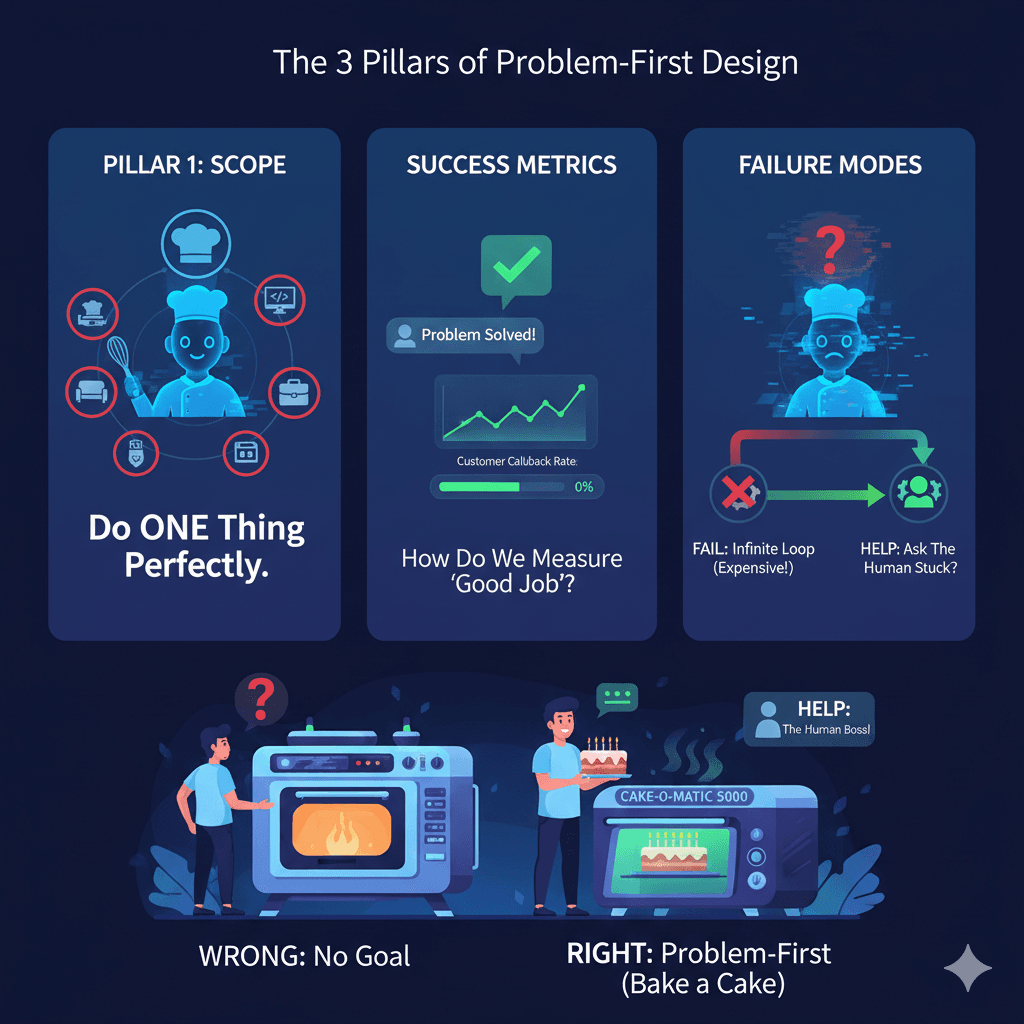
The 3 Pillars of Problem-First Design
- Scope: You must set boundaries. A “Problem-First” agent doesn’t try to be your therapist, your coder, and your chef all at once. It does one thing perfectly.
- Success Metrics: How do we know if the AI is doing a good job? If it’s a customer service agent, a “good job” means the customer didn’t have to call back.
- Failure Modes: You must decide what happens when the AI gets confused. Does it just keep trying (and wasting money)? Or does it stop and say, “Hey human, I need help”?
You don’t buy a high-tech oven and then wonder if you should bake bread or a turkey. You decide you want to bake a cake for a birthday, and then you go find the oven that works best for cakes.
Step 1: Framing the “Job Description” for Your Agent
Before you open your laptop to code, you need a piece of paper. You need to write a Job Description for your Agent.
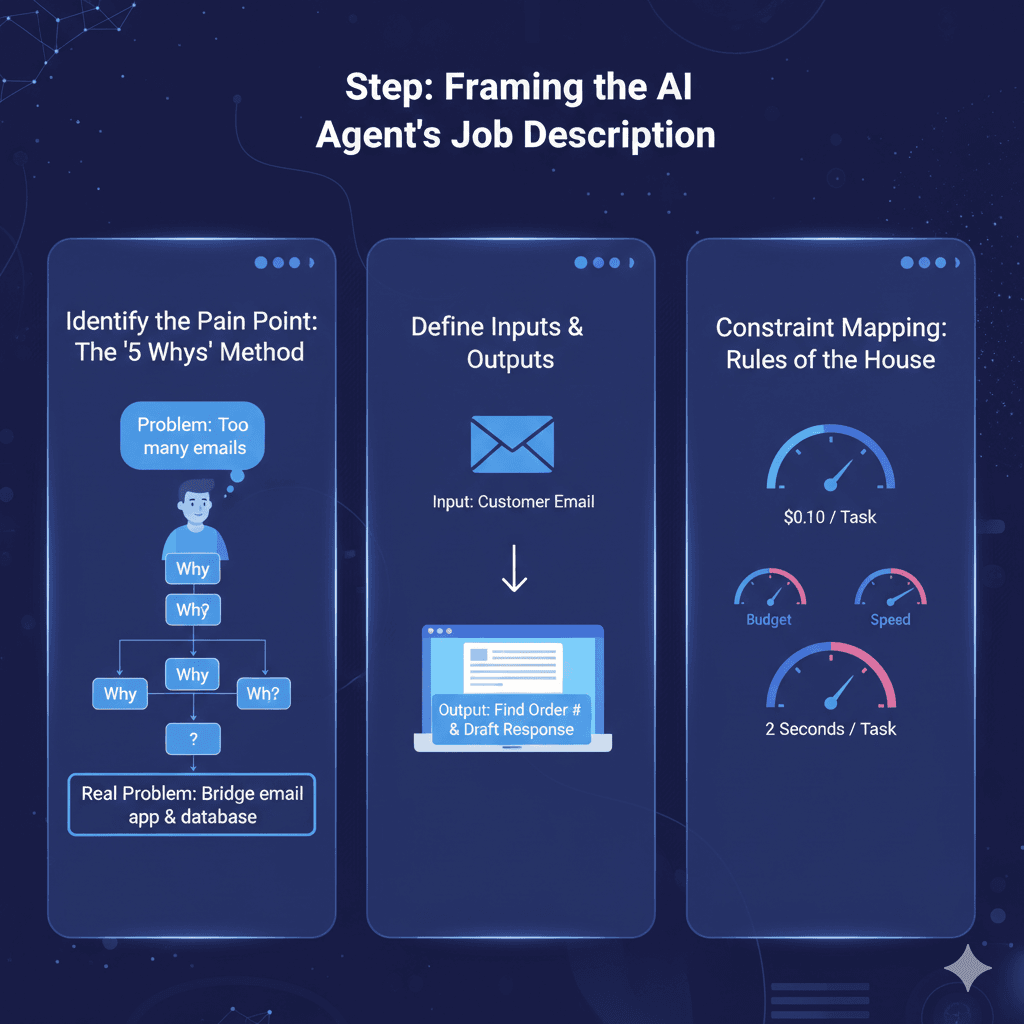
Identify the Pain Point
Use the “5 Whys” method.
- Problem: I spend too much time on emails.
- Why? Because I have to look up order numbers for every customer.
- Why? Because our system doesn’t automatically show order history in the email app.
- Why? Because the two apps don’t talk to each other.
- The Real Problem: I need an agent that can bridge the gap between the email app and the database.
Define Inputs & Outputs
- Inputs: What does the agent “see”? (e.g., The text of an incoming email).
- Outputs: What does the agent “do”? (e.g., It finds the order number and drafts a response).
ConstraintMapping
This is the “Rules of the House.”
- Budget: How much are you willing to pay per task? ($0.10? $1.00?)
- Speed: Does it need to happen in 2 seconds, or can it take 5 minutes?
Step 2: Architecture Design (The “Brain” and the “Hands”)
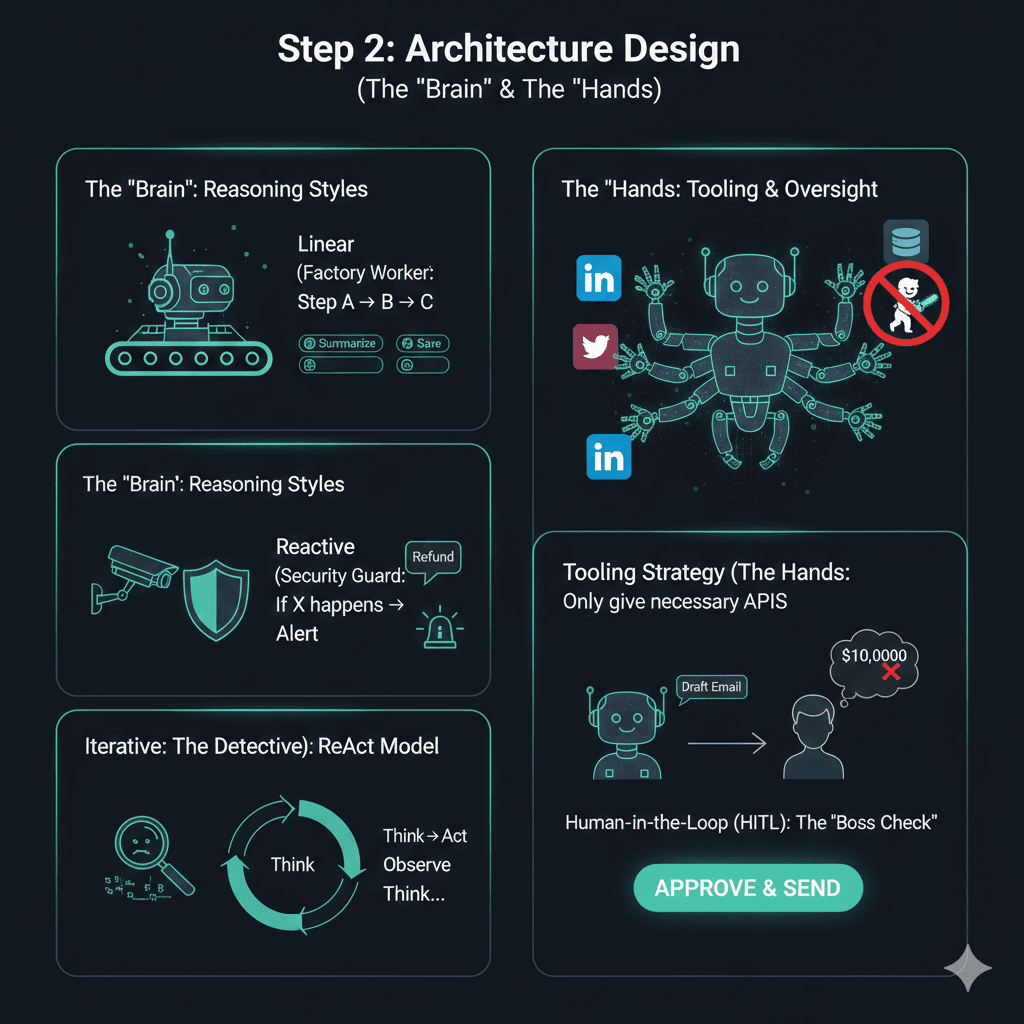
Building an agent is like building a tiny robot. You need to design the Brain (how it thinks) and the Hands (how it touches the world).
Choosing the Reasoning Style
Not every agent needs to be a genius.
- Linear (The Factory Worker): It always does Step A, then Step B, then Step C. This is great for simple things like “Summarize this document and save it to Dropbox.”
- Reactive (The Security Guard): It waits for something to happen and then reacts. “If someone mentions a ‘refund’ in a message, send me an alert.”
- Iterative (The Detective): This is the ReAct (Reason + Act) model. The agent thinks: “I need to find the order number. I will look in the database. [Action]. Oh, I see the order was canceled. Now I will check the refund status.”
Tooling Strategy (The Hands)
Tools are APIs. If your agent is a “Social Media Manager,” its tools are the Twitter API and the LinkedIn API. A problem-first approach means you only give the agent the tools it absolutely needs. Giving an AI too many tools is like giving a toddler a chainsaw as it’s going to end in a mess.
Human-in-the-Loop (HITL)
In 2026, the best agents are not 100% autonomous. They have a “Boss Check.” * Example: The AI can draft the refund email, but a human must click “Send.” This prevents the AI from accidentally giving away $10,000 to a prankster.
Step 3: Building the “Evaluation Flywheel”
This is where most people fail. They build an agent, try it once, it works, and they say “It’s finished!”
Demos are deceptive. Just because an AI got it right once doesn’t mean it will get it right 1,000 times.
Creating a “Golden Dataset”
You need a test. Create a list of 50 real-life problems your agent will face.
- Test 1: Customer is angry.
- Test 2: Customer forgot their order number.
- Test 3: Customer is typing in a different language.
Run your agent against this “Golden Dataset” every time you change the code. If the success rate drops, you know you broke something.
Metrics That Matter
- Task Success Rate: Out of 100 tries, how many times did it finish the goal?
- Cost per Task: If the agent costs $2.00 in AI “tokens” to solve a problem, but a human only costs $1.00, your agent is a failure.
- Hallucination Rate: How often did it lie or make up a fake order number?
Step 4: Selecting the Right Stack (Tools & Frameworks)
In 2026, you have amazing choices for how to build. But remember: Problem first, Tool second.
Framework Comparison
- LangGraph (LangChain): Best for “Stateful” workflows. If your agent needs to remember a lot of information over a long conversation, use this. It’s like giving the AI a very detailed notebook.
- CrewAI: Best for “Multi-Agent” teams. If you have a big problem (e.g., “Write a 2000-word blog post”), you can have one agent do the research, one do the writing, and one do the editing.
Design multi-agent systems that scale beyond demos with Crew AI - Microsoft AutoGen: Best for high-autonomy research. These agents are great at “talking to themselves” to solve a hard math or coding problem.
Model Selection
Don’t always use the biggest, most expensive model (like GPT-4o or Claude 3.5).
- Use Heavy Models for the “Planning” phase (deciding what to do).
- Use Fast/Cheap Models (like Gemini Flash or Llama 3) for the “Doing” phase (summarizing text or formatting data).
Step 5: Guardrails and “Failure Modes”
If you don’t give your agent guardrails, it will eventually do something embarrassing or expensive.
The “Spinning Wheels” Trap
Sometimes an agent gets stuck. It tries to open a file, fails, tries again, fails, and repeats this 1,000 times in a minute. This can cost you hundreds of dollars in seconds.
- The Fix: Set a “Max Steps” limit. Tell the agent: “If you can’t solve this in 5 steps, stop and ask me for help.”
Least-Privilege Access
Never give an AI agent your “Master Password” or full access to your computer.
- The Rule: Only give the agent permission to see the specific data it needs for its job. If it’s a “Meeting Scheduler,” it needs to see your calendar, but it does not need to see your bank statements.
Common Mistakes to Avoid While Building Agentic AI Applications(The Expert Tips)
Mistake #1: Building a “God Agent”
Beginners try to build an agent that can “do everything.” These always fail. They get confused and slow.
- Expert Tip: Build “Micro-Agents.” One agent for one specific task. Then, have them work together.
Mistake #2: Ignoring Data Quality
If your internal company documents are a mess, your agent will be a mess.
- Expert Tip: Spend 50% of your time cleaning your data and 50% building the AI. Garbage In = Garbage Agent.
Mistake #3: Over-Automating High-Risk Tasks
Don’t let an AI agent handle things that are “Irreversible.”
- Expert Tip: If a task involves spending more than $50, or deleting data, or sending a message to a CEO, always put a human “Approve” button in the middle.
FAQs: People Also Ask
Q: How do I start building an AI agent if I’m not a pro coder?
A: Start with “Low-Code” tools like Zapier Central or Lindy.ai. They allow you to build “Problem-First” agents by just talking to the computer and connecting your apps.
Q: What is the best framework for Agentic AI?
A: There is no “best.” LangGraph is the most powerful for complex business rules. CrewAI is the most fun and easiest for building teams. Always pick based on your specific problem.
Q: Why do my agents keep hallucinating?
A: Usually, it’s because your instructions (the prompt) are too vague. Give the agent “Reference Material.” Tell it: “Only use the information in this PDF to answer the question. If the answer isn’t there, say you don’t know.”
Q: How do you measure the ROI (Return on Investment)?
A: Total up the cost of the AI (API fees + developer time) and compare it to how many hours of human work it saved. If a human spent 10 hours a week on this, and the AI now does it for $10/week, you’ve won!
Conclusion & Your Next Move
The “Problem-First” approach is the difference between a project that stays on your computer and a project that changes your life.
Stop looking at the shiny new models and start looking at the annoying things you do every day. Find that one task that makes you sigh when you open your laptop. That is your agent’s first job.
Your 24-Hour Mission:
- Observe: Today, write down one task you do that feels repetitive.
- Define: Write a “Job Description” for an agent to do that task.
- Build: Use a tool like Lindy.ai or Zapier to build a tiny version of that agent.
The future isn’t built by people who have the best AI. It’s built by people who solve the best problems.