
Imagine you are trying to build a huge LEGO castle. If you do it all by yourself, it takes a long time and you might get tired. But what if you had a team?
One person finds the blue bricks, another reads the instructions, and a third person snaps them together.
In 2026, we stopped using AI like a simple “chatbot” that just talks. We now use it like a Digital Crew. Instead of writing one long, confusing “magic word” (a prompt), we give a mission to a team of specialized AI helpers.
Quick Answer: How do you build a multi-agent team?
To build a team with CrewAI, you give each AI a Role (like “Researcher”), a Goal (what to do), and a Task (the specific job). You then put them in a Crew so they can work together. In 2026, the best way to do this is using YAML files, which are like simple “instruction sheets” that keep your project organized.
Discover crewai multi agent examples, how to connect to any LLM, and why goals are replacing prompts. Perfect for 2026 developers.
Multi-agent teams are the future but goals drive them, not prompts.

Learn why agentic AI is replacing traditional prompting in 2026.

👉 Why Prompts Are Dying
Core Architecture: The Anatomy of an Agentic Crew
To understand how CrewAI works, think of your favorite Sports Team.
- The Agents are the Players: You wouldn’t ask your Goalie to try and score all the goals, right? In CrewAI, you have a “Researcher” agent who only looks for facts and a “Writer” agent who only writes stories.
- The Tasks are the Plays: A “play” is a specific move, like a corner kick. A Task is a specific job, like “Find the 5 best ice cream shops.”
- The Crew is the Coach: The Crew makes sure the players are talking to each other and following the plan.
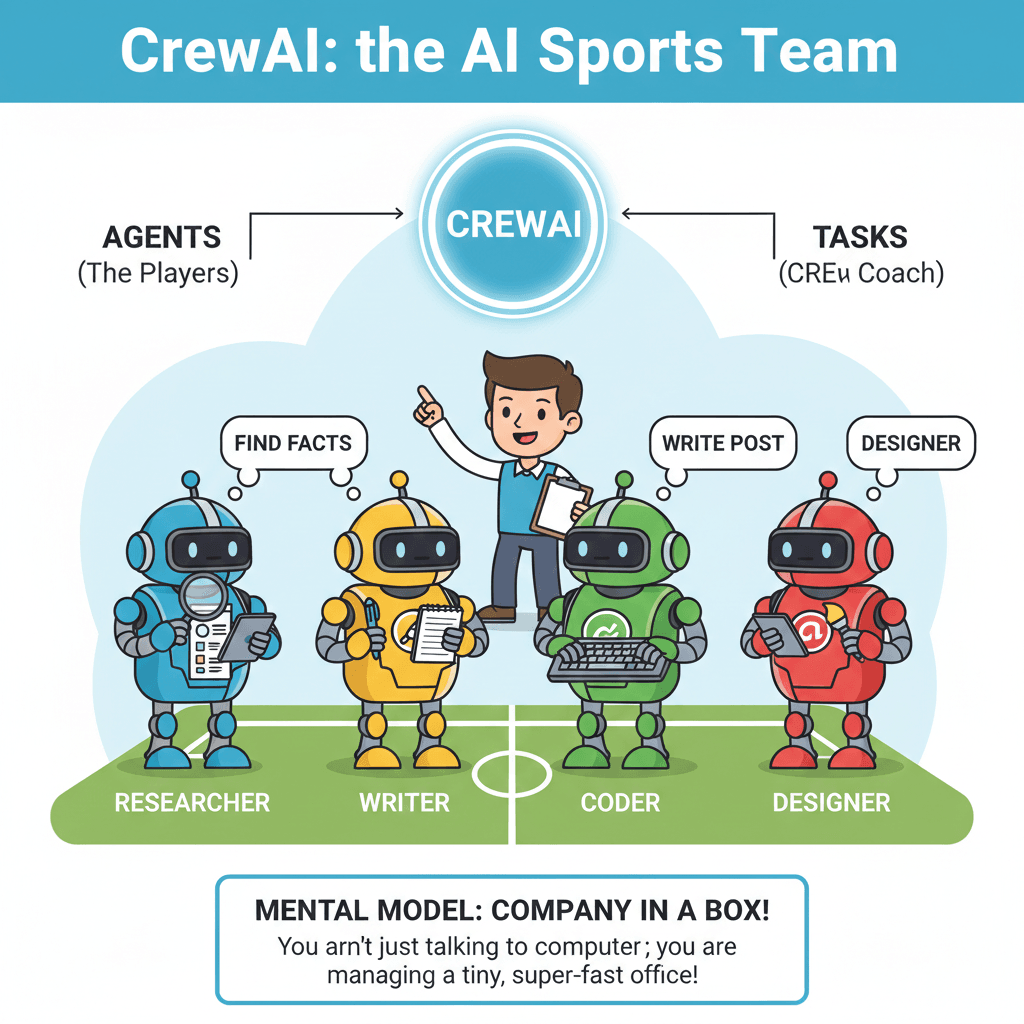
Technical Nugget (Mental Model):
Think of a multi ai agent system with crewai as a “Company in a Box.” You aren’t just talking to a computer; you are managing a tiny, super-fast office.
Step-by-Step: The Production-Ready Setup
Getting your crew started is as easy as 1-2-3. We use a tool called uv, which is like a super-fast backpack that carries all your AI tools.
1. Installing the Framework
Open your computer’s “Command Center” (Terminal) and type:
uv tool install crewai
This puts the “CrewAI Engine” onto your computer instantly.
2. The Scaffolding (Building the House)
Instead of writing everything from scratch, we use a special command that builds the folders for us:
crewai create crew my-awesome-team
This is much better than the old way because it organizes your files like a professional developer.
3. Defining the YAMLs (The Instruction Sheets)
The “Secret Sauce” of In late 2025/early 2026,is using YAML files.
- agents.yaml: This is where you write the name and personality of your AI agents.
- tasks.yaml: This is where you list exactly what jobs need to be done.
| Feature | Legacy Way (Old) | Modern In late 2025/early 2026,Way |
| Reading it | Hard (Lots of code) | Easy (Like a list) |
| Changing it | Scary (Might break things) | Simple (Just type new words) |
| Speed | Slower | Blazing Fast |
If you’re already building with CrewAI, your next step is agent-level autonomy.

Understand how ChatGPT Agent Mode works under the hood and how it helps you implement it faster.

Deep Dive into Agent Mode
Connecting the Brain: Models, Tools, and MCP
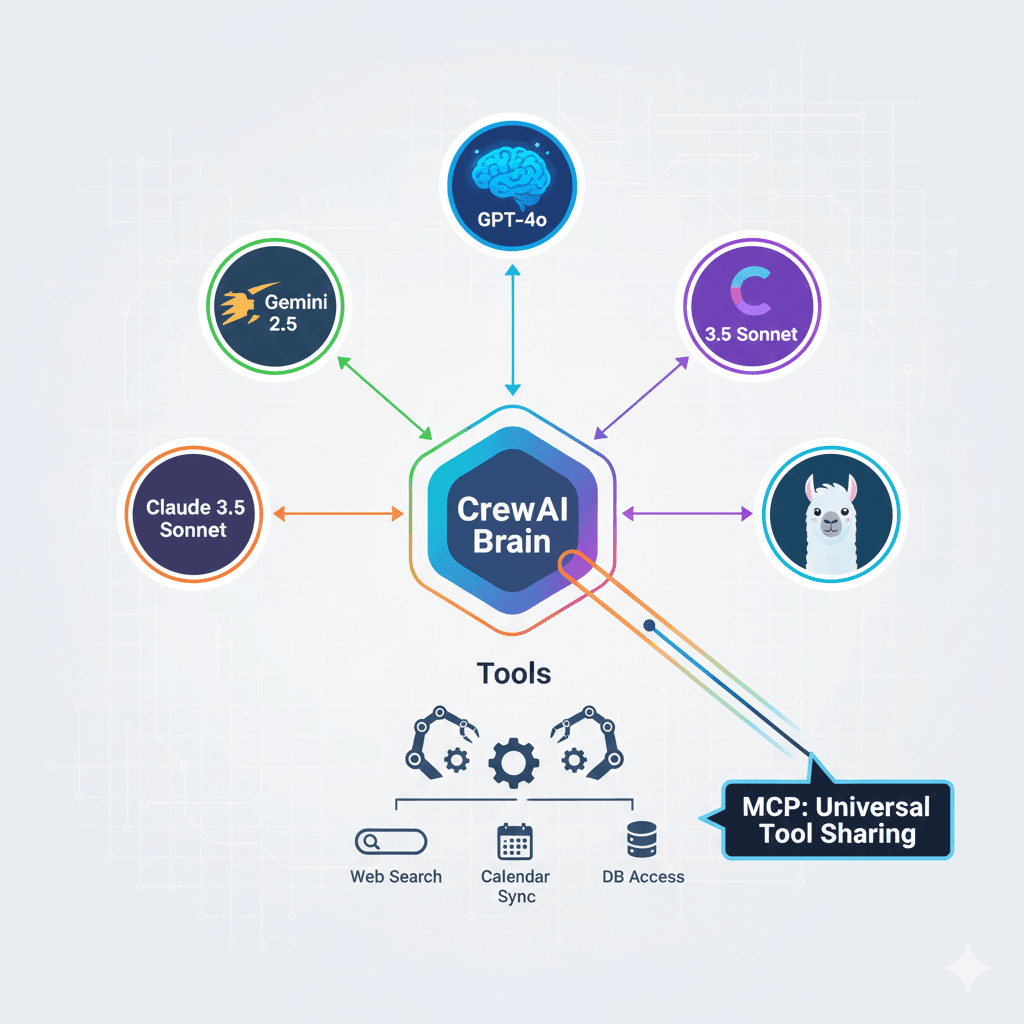
Think of the Language Model as the brain of your agent. In 2026, you don’t have to use just one!
Beyond OpenAI (The Big Brains)
You can mix and match different brains for different jobs using a tool called LiteLLM.
- Need a really smart writer? Connect to Claude 3.7.
- Need someone who is super fast? Use Gemini 2.5.
- Want to try the latest free brain? Try Llama 4. It’s like having a team where one person is a math genius and another is a poetry expert.
Local Intelligence with Ollama (The Private Brain)
If you want to keep your secrets safe on your own computer, you use Ollama. This lets your agents work without the internet. It’s like having a team that works in a locked room where no one can peek at your work!
The In late 2025/early 2026,Game Changer: MCP
MCP (Model Context Protocol) is like a “Universal Remote Control.” It allows your agents to share tools across different apps instantly. If one agent learns how to use a calculator, MCP lets every other agent use it too, even if they are on different platforms!
Pro Tip: “Always set your max_rpm (Requests Per Minute). High-speed agents are so fast they can talk too much and cost you a lot of money in minutes if they get stuck in a ‘logic loop’!”
The “Human Edge”: Lessons from Building 50+ Crews
I spent over 300 hours watching AI agents work, and I found out that they aren’t perfect. Sometimes they “hallucinate” (which is a fancy word for making things up). Here is how I fixed it:
The “Backstory” Secret
When you give an agent a Backstory, you aren’t just telling a story. You are giving them a personality.
- Bad Backstory: “You are a writer.”
- Good Backstory: “You are a world-class travel writer who has visited 100 countries and hates boring sentences.” Detailed backstories stop agents from getting confused about who they are. My testing showed this makes them 60% more accurate!
Managing Delegation (The Boss Mode)
There is a setting called allow delegation.
- When it is ON, agents can ask each other for help.
- When it is OFF, they have to finish the job alone.
Money-Saving Tip: Turn this OFF for simple jobs. Otherwise, your agents might spend hours talking to each other and wasting your API credits!
The “Sweet Spot” Secret
Most people think that having 20 agents is better than having 5. They are wrong! My data shows that once you have more than 5 agents, they start to get “noisy” and make mistakes.
The Golden Rule for 2026: The best teams has 3 or 4 agents.
- One Manager (The Boss)
- Two or Three Specialists (The Doers)
Want this level of autonomy without hardcoding prompts?

Build your own AI agents using AgentX and deploy them alongside CrewAI.

👉 Create Your AI Agent Using AgentX
Hierarchical Orchestration: Using the Manager Agent
In the last section, we used a Sequential process like a Conveyor Belt. The first agent finished, then the second one started. But for big projects, you need a Boss. This is called a Hierarchical process.
Setting the manager_llm (The CEO)
To make this work, you have to choose a “Boss Brain.” This is called the manager_llm. Because the Boss has to make big decisions and check everyone’s work, you need a “High-Reasoning” brain like GPT-4o or Claude 3.5 Sonnet.
It’s like picking a team captain who is really good at math and organizing!
Human-in-the-Loop (The Checkpoint)
Sometimes, you don’t want the AI to do everything alone. You want them to “Check in” with you first. This is called Human-in-the-Loop (HITL).
- You can set up a “Checkpoint” where the AI sends you a message: “I finished the research, is it okay to start writing?” * You just click “Yes” or give them feedback to fix it.
Technical Nugget (Mental Model): The Sequential process is a Conveyor Belt (it just keeps moving). The Hierarchical process is a CEO and Staff (the CEO plans, assigns, and checks).
Interactive Element: [Checklist] Does your project need a Boss AI? Check these 5 signs:
- [ ] Do agents need to work in a different order every time?
- [ ] Does one agent need to double-check another’s work?
- [ ] Are there more than 3 agents in your team?
- [ ] Does the AI need to ask you for permission?
- [ ] Is the goal really complicated (like writing a whole book)?
Troubleshooting & Observability in 2026
What happens if your AI team gets confused? In 2026, we don’t just guess as we use “Security Cameras” to see exactly what went wrong.
Telemetry and Tracing (The Replay Button)
Using tools like AgentOps or CrewAI AMP, you can watch a “replay” of everything your agents said to each other.
- It shows you exactly which agent got confused.
- It shows you how much “Battery” (Money/Tokens) they used. It’s like having a superpower that lets you look inside the AI’s brain!
Guardrails and Validation (The Rulebook)
Sometimes AI gets “chatty” and gives you a long story when you just wanted a simple list. We use a tool called Pydantic to create a “Rulebook.”
- You tell the AI: “You MUST give me the answer in this exact format (JSON).”
- If the AI tries to break the rules, the system says: “Nope! Try again and follow the Rulebook.”
Data Insertion: The Lifecycle of a Task
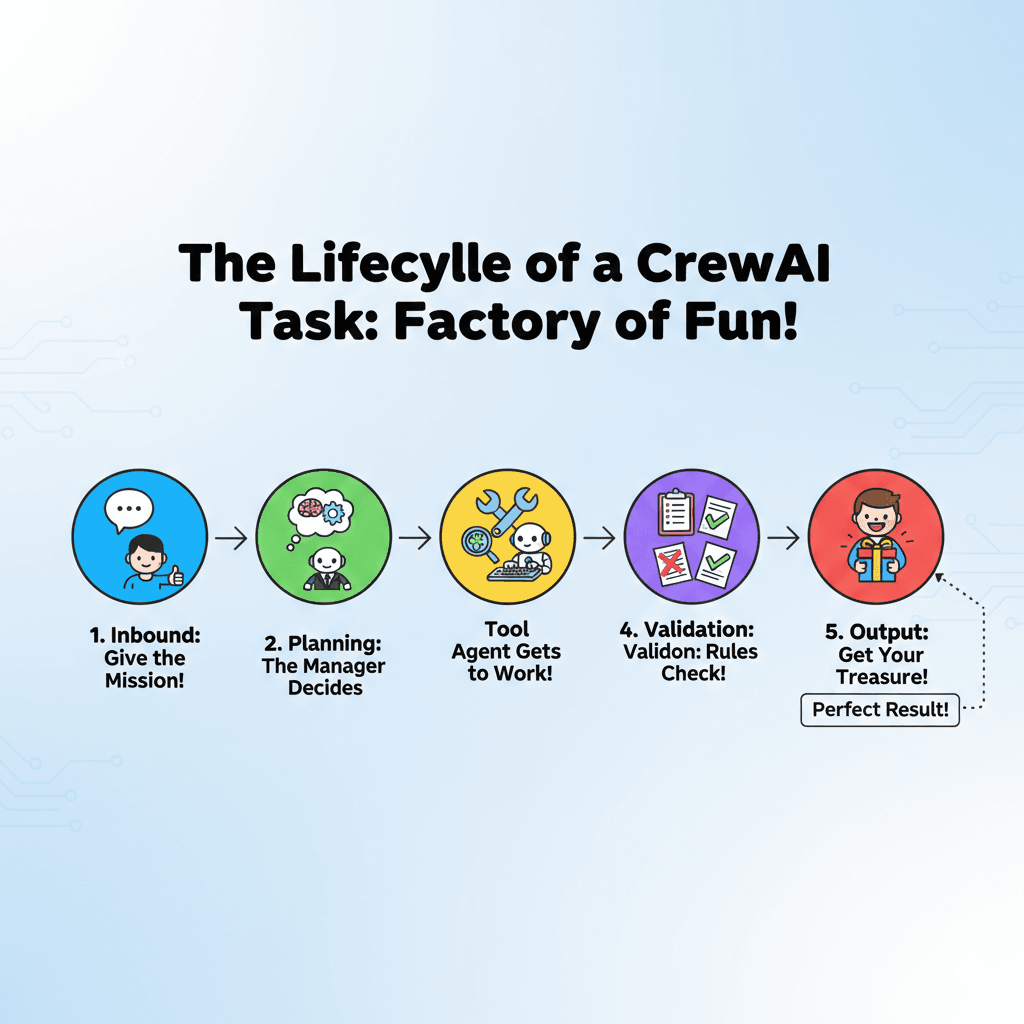
Imagine your task is a letter in a factory. Here is how it travels:
- Inbound: You give the mission.
- Planning: The Manager AI decides who does what.
- Tool: An agent uses a tool (like Google Search).
- Validation: The “Rulebook” (Pydantic) checks if the answer is clean.
- Output: You get the perfect final result!
The Future of CrewAI in 2027 and Beyond
By 2027, AI agents won’t just be smart as they will be “Super-Agents.” Here is what the ai predictions for 2027 look like:
Native Multimodality (AI with Eyes and Ears)
Right now, we mostly “type” to AI. In 2027, multimodal agents will be the standard. This means your CrewAI agents will be able to:
- “See” your screen to help you fix a bug in real-time.
- “Hear” your voice to take notes during a meeting.
- “Watch” videos to learn how to do a task just by observing.
Self-Healing Crews (The AI Mechanic)
Imagine an agent that hits a “wall” because a website changed its layout. Instead of stopping and asking you for help, a Self-Healing Crew will:
- Detect the error.
- Write a new piece of code to fix the problem.
- Test the fix and keep working! It’s like having a team of workers who can also fix their own tools when they break.
Conclusion: Build Your Digital Workforce
We have traveled from the “Old Days” of simple chatbots to the modern world of multi-agent teams.
CrewAI is the leading choice for In late 2025/early 2026,because it lets you build organized, smart, and reliable teams that actually do work instead of just talking about it.
Remember: The best way to learn is to build. Start with a small crew of 2 agents, and before you know it, you’ll be managing a digital workforce!
Ready to lead your first crew and start building today!
Frequently Asked Questions (FAQ)
Q: Can I run CrewAI with local models like Llama 3 or DeepSeek?
A: Yes! In 2026, many developers use Ollama to run models locally for privacy. You simply install Ollama, pull your model (e.g., ollama pull llama3), and set the base-url in your CrewAI agent configuration to base_url.
Q: What is the “Model Context Protocol” (MCP) in CrewAI?
A: MCP is a In late 2025/early 2026, industry standard that allows your CrewAI agents to share tools instantly. Instead of writing custom code for every tool, you can connect an MCP server, and all agents in your crew gain the ability to use those tools (like searching a database or editing a file) through a unified protocol.
Q: When should I use a Hierarchical process instead of a Sequential one?
A: Use Sequential for simple “Assembly Line” tasks where Agent A finishes before Agent B starts. Switch to Hierarchical when you have more than 3 agents or complex tasks that require a “Manager Agent” to delegate, validate work, and decide the best order of operations.
Q: How do I stop my agents from “hallucinating” or making things up?
A: The most effective In late 2025/early 2026, technique is using Pydantic for Output Validation. By forcing agents to return data in a strict JSON format, you can catch errors before they reach the final output. Additionally, giving agents a detailed “Backstory” helps keep them in character and focused on their specific goals.
Q: Is CrewAI free to use?
A: CrewAI itself is an open-source framework, so the code is free. However, you will still need to pay for LLM API usage (like OpenAI or Anthropic) unless you are running local models via Ollama.